Running your production
Timeline & phases
Move your production through its four phases, and track the milestones.
The Timeline is where you move your production through its four phases and keep an eye on the milestones that matter.
You will find it under Production in the menu on the left.
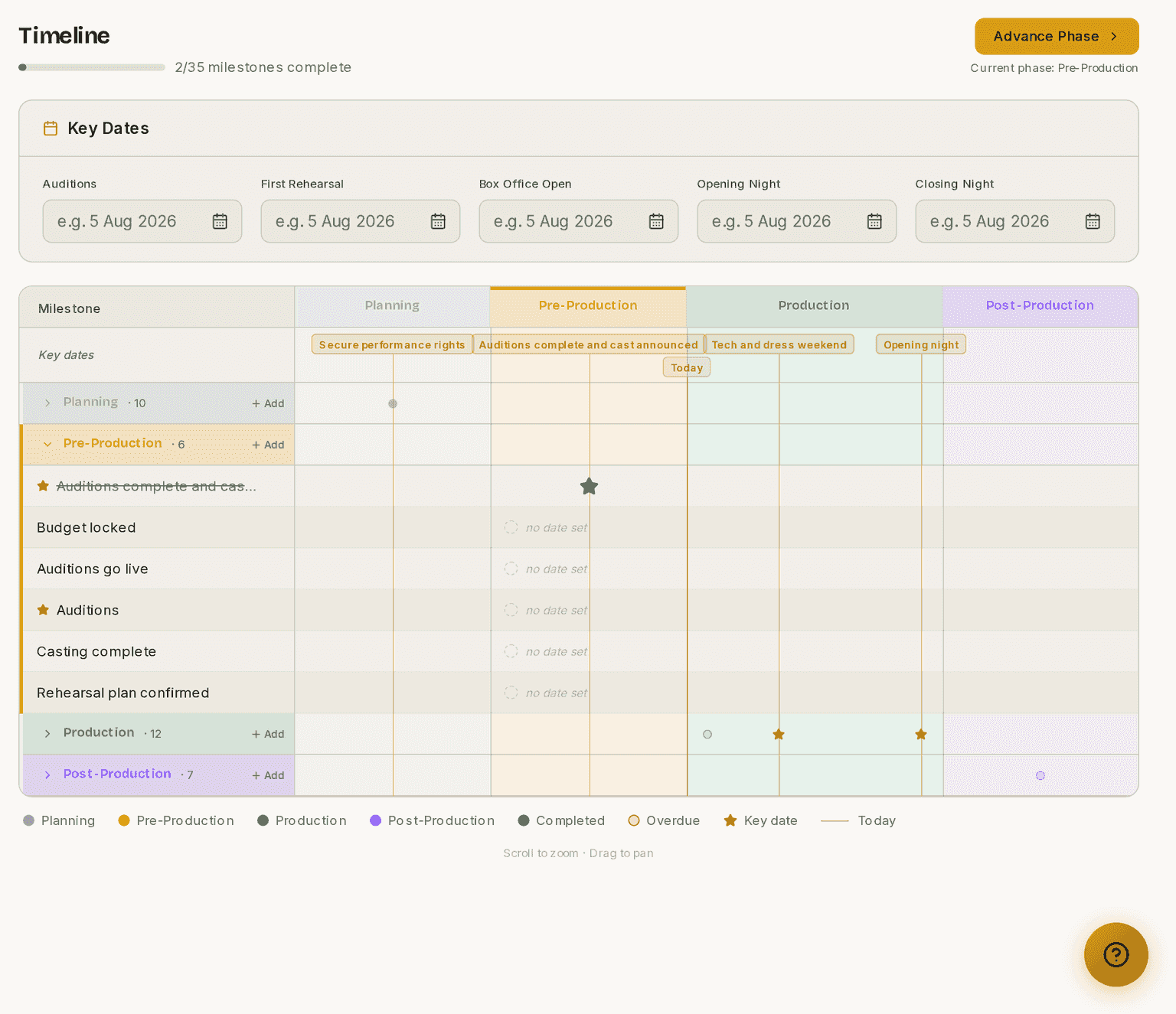
Screenshots show the light theme. The app looks the same in dark.
How to advance the phase
- Open Timeline.
- Click Advance Phase.
- Read what the dialog says advancing will do.
- Click the confirm button to advance.
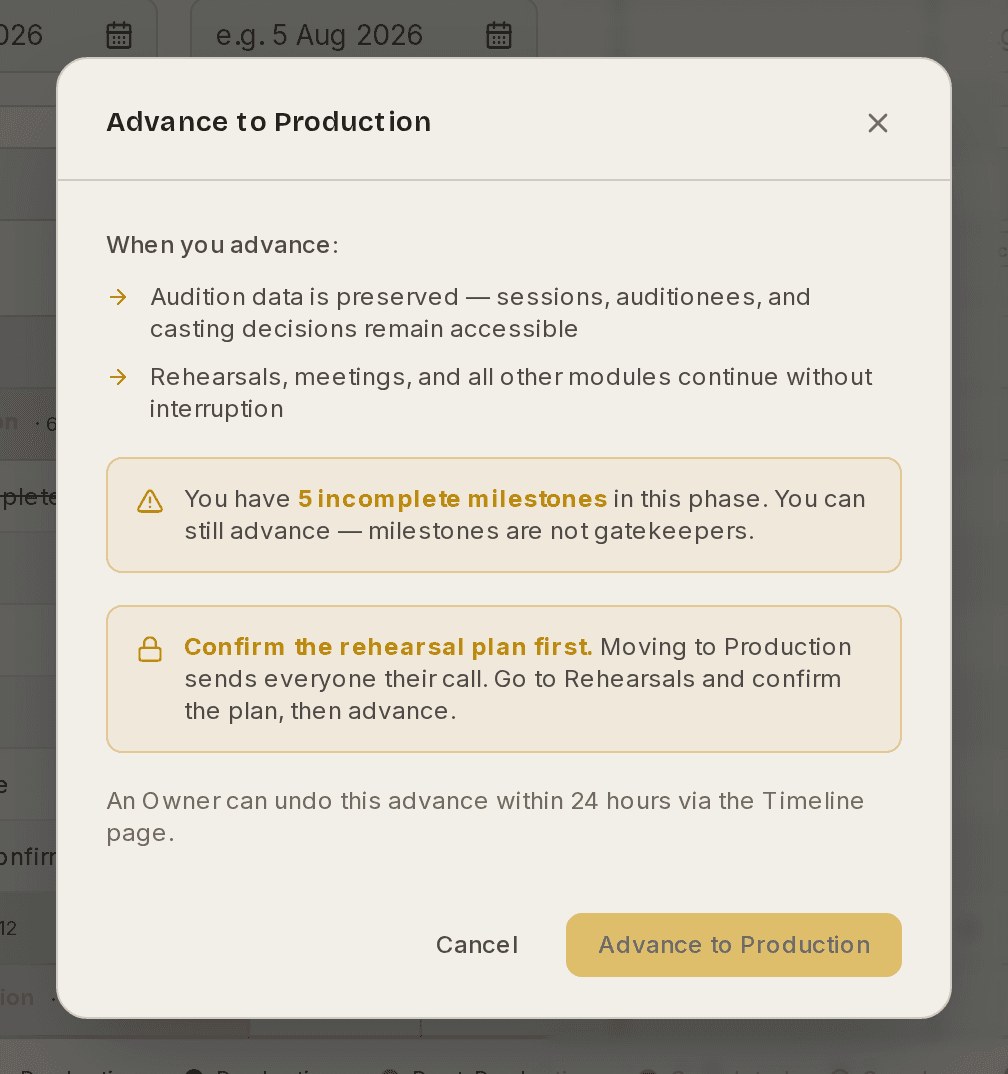
The dialog lists what is preserved, warns about anything incomplete, and names anything blocking the move. Milestones are not gatekeepers — you can advance with them outstanding, and the dialog says so.
An Owner can undo an advance within 24 hours, from the Timeline page.
What each phase changes
The phase is not just a label. Several features are gated on it:
- ⚠ Public audition sign-ups only go live in Pre-Production, along with the Auditions button on your public website. They close again when you move past it. If your audition link is not accepting entries, check the phase first — you are most likely still in Planning.
- ⚠ Moving to Production sends your rehearsal calls. Your rehearsal plan has to be confirmed first. If the Advance button is disabled, that is usually why. See How to confirm the plan and send the calls.
- ⚠ Leaving Planning locks your budget plan. From Pre-Production onwards you record actual spend rather than editing the plan. If you have not built a budget yet, the dialog warns you before you go, because building one afterwards is not possible.
If you are a Manager, your production Dashboard carries a short reminder of where you are, what you can do in this phase, and what the next one unlocks — with an Advance link straight here.
How to add a milestone
- Open Timeline.
- Click Add beside the phase the milestone belongs to.
- Give it a title and a due date.
- Mark it a key date if it should stand out.
Milestones give you a single view of where you are and what is coming, from auditions through to opening night and beyond. Tick one off when it is done.
How to close and archive a finished show
When the run is over, the accounts are settled and nothing is left to change, use Close & archive on the Timeline. Closing and archiving happen together, because in practice they are the same moment.
Archiving does five things:
- The production becomes read-only for everybody, including you.
- It stops counting towards your active production limit, so you can start planning the next show. On the free tier, with its one-show limit, this is what frees you up.
- Ticket sales stop, and the show moves to Past Shows on your public website.
- Its files stop counting towards your storage allowance.
- Everything stays readable and exportable. Archiving tidies a show away; it never locks your data up.
Changed your mind? Restore production brings it back to Post-Production and makes it editable again.
Before you archive
⚠ Thirty days after you archive, audition files from people you did not cast are permanently deleted.
That is deliberate. Somebody who auditioned and was not cast sent you a video or a CV for one audition, for one show that is now finished. Keeping it indefinitely is not right, and our Privacy Policy commits us to clearing it out.
What is kept: files from the people you did cast, anything your own team uploaded, and every auditionee's name and contact details. Only the applicant-uploaded files of people who were not cast are removed.
The thirty days exist so archiving by mistake is never a disaster. Restore within the month and everything comes back exactly as it was.
Who can advance or archive
Advancing the phase, closing and archiving, and restoring are all Manager actions. They are deliberate steps, so the production only moves when the person running it says so.
These guides describe Prompter as it works today. Create a free account to try it, or see what it costs.